A practical guide to VPN tunnels, routing, encryption, IPsec, and packet flow
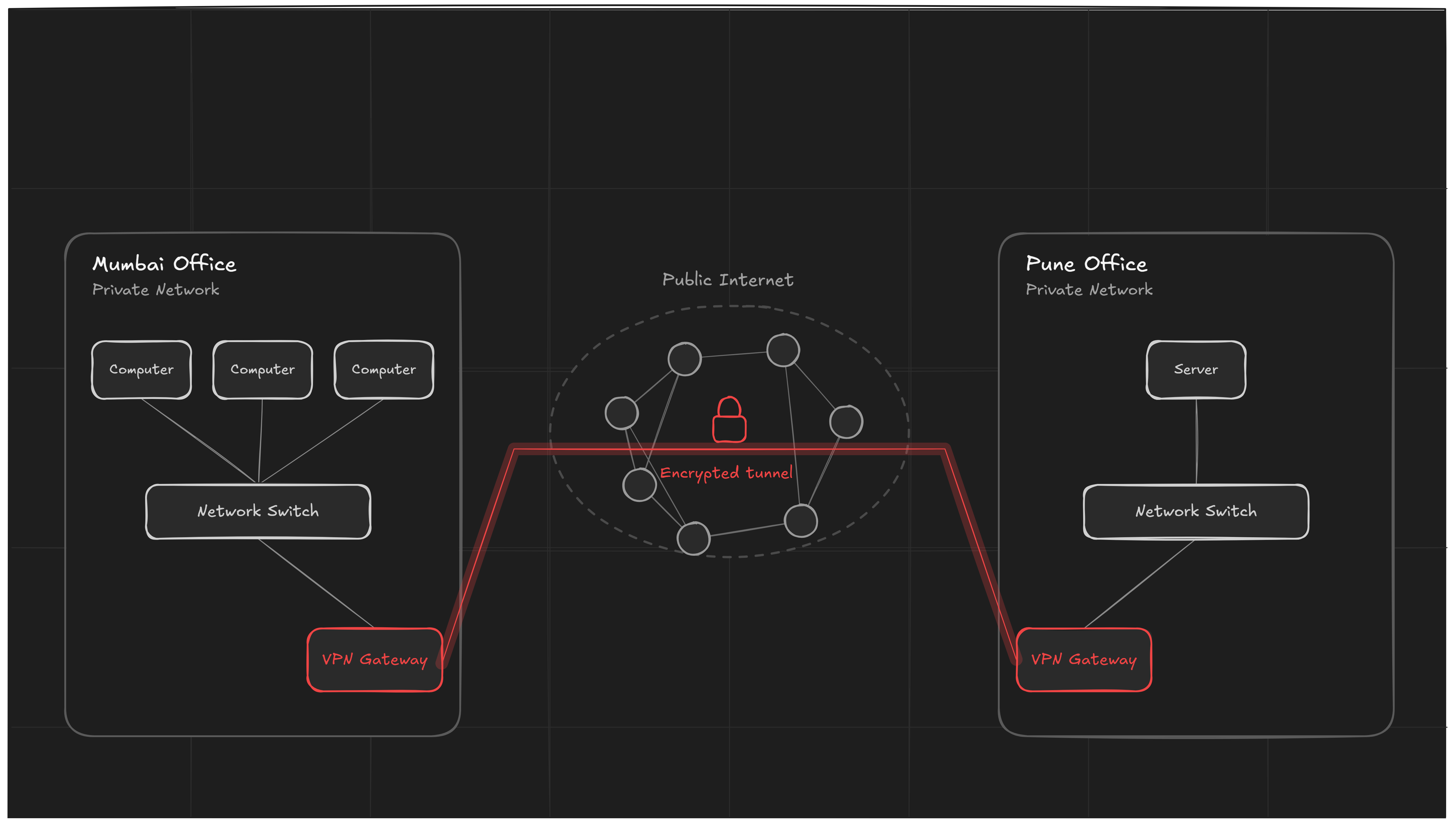
Imagine a company has two offices: one in Mumbai and another in Pune. Both offices have their own private computer networks. Employees in Mumbai need to access servers and applications located in Pune, but the two offices are separated by the public Internet.
How can these private networks communicate without sending their internal traffic as ordinary Internet traffic?
The answer is a Site-to-Site VPN.
A Site-to-Site VPN creates a secure connection between two networks over an untrusted network such as the Internet. Instead of requiring every computer to run VPN software individually, VPN gateways at the two sites establish the secure tunnel and carry traffic between the networks.
1. What Is a VPN?
VPN stands for Virtual Private Network.
A VPN creates a logical, protected communication path over an existing network. The Internet can be used as the underlying transport, while the VPN provides mechanisms such as encryption, authentication, and integrity protection.
A simple idea is:
Private Network A → Secure VPN Tunnel → Private Network B
The physical connection is still the Internet, but the communicating devices can treat the VPN as a private communication path.
2. What Is a Site-to-Site VPN?
A Site-to-Site VPN connects one entire network to another network.
For example:
- Site A: Mumbai office
- Site B: Pune office
- Transport: Public Internet
- VPN gateways: One at each office
- Protected traffic: Communication between the two private networks
The computers inside the offices generally do not need to know that the VPN exists. They send packets normally, and the VPN gateway handles the secure encapsulation and forwarding.
Basic architecture
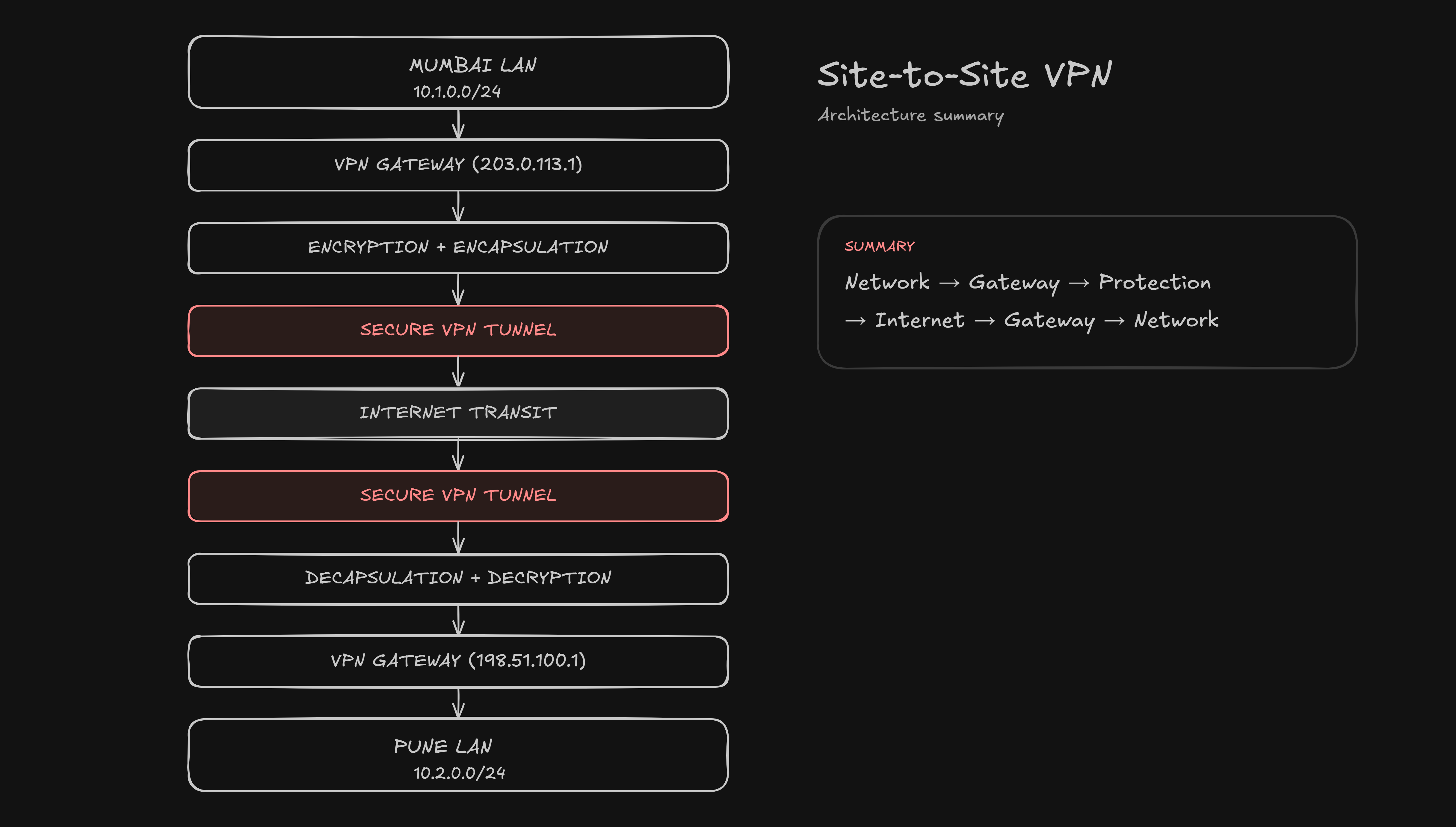
The two gateways are the important endpoints of the site-to-site VPN.
3. Why Do We Need a Site-to-Site VPN?
Without a VPN, a company could connect its offices directly using private leased connectivity, but that can be expensive and less flexible.
A Site-to-Site VPN allows organizations to use the existing Internet infrastructure while protecting traffic that crosses it.
Common use cases include:
- Connecting corporate branch offices
- Connecting headquarters and data centers
- Connecting an office to a cloud virtual network
- Connecting campuses or remote facilities
- Allowing internal applications at one site to be accessed from another site
4. The Two Networks in Our Example
Let us use a simple example throughout the blog.
Mumbai Office
Private Network: 192.168.10.0/24
VPN Gateway:     192.168.10.1
Pune Office
Private Network: 192.168.20.0/24
VPN Gateway:     192.168.20.1
These are different private IP networks.
Suppose a computer in Mumbai has:
Source IP:      192.168.10.50
Destination IP: 192.168.20.20
The destination belongs to the Pune network, so the Mumbai gateway knows that this traffic must be sent through the VPN.
5. Main Components of a Site-to-Site VPN
5.1 Private Networks
Each office has its own LAN with computers, servers, printers, applications, and other devices.
Example:
Mumbai LAN → 192.168.10.0/24
Pune LAN   → 192.168.20.0/24
5.2 VPN Gateways
A VPN gateway is the device that establishes and maintains the VPN connection.
Depending on the environment, it may be:
- A router
- A firewall
- A dedicated VPN appliance
- A cloud VPN gateway
The gateway performs tasks such as encryption, decryption, authentication, and packet forwarding.
5.3 Internet
The Internet provides the underlying transport between the two locations.
It is considered an untrusted network from the organization’s point of view.
5.4 VPN Tunnel
The tunnel is the logical protected path established between the VPN gateways.
It does not mean that a special physical cable has been created. Instead, VPN protocols use encapsulation and cryptographic protection to provide a secure logical connection over the Internet.
6. How Does a Site-to-Site VPN Work?
The complete process can be understood in five major stages:
1. Detect the destination network
A device in Mumbai wants to communicate with a device in Pune.
2. Forward the packet to the VPN gateway
The Mumbai router/gateway sees that the destination network is reachable through the VPN.
3. Protect the packet
The VPN gateway encapsulates and cryptographically protects the traffic according to the configured VPN technology.
4. Send it across the Internet
The protected traffic travels through the public Internet to the Pune VPN gateway.
5. Decrypt and forward
The Pune gateway validates and decrypts the protected traffic, then forwards the original packet to the destination device.
7. Packet Flow: Mumbai to Pune
Suppose:
Mumbai PC:
192.168.10.50

Pune Server:
192.168.20.20
The Mumbai PC generates a packet:
Source:      192.168.10.50
Destination: 192.168.20.20
The packet reaches the Mumbai VPN gateway.
The gateway recognizes that 192.168.20.0/24 is the remote network and applies the VPN policy.
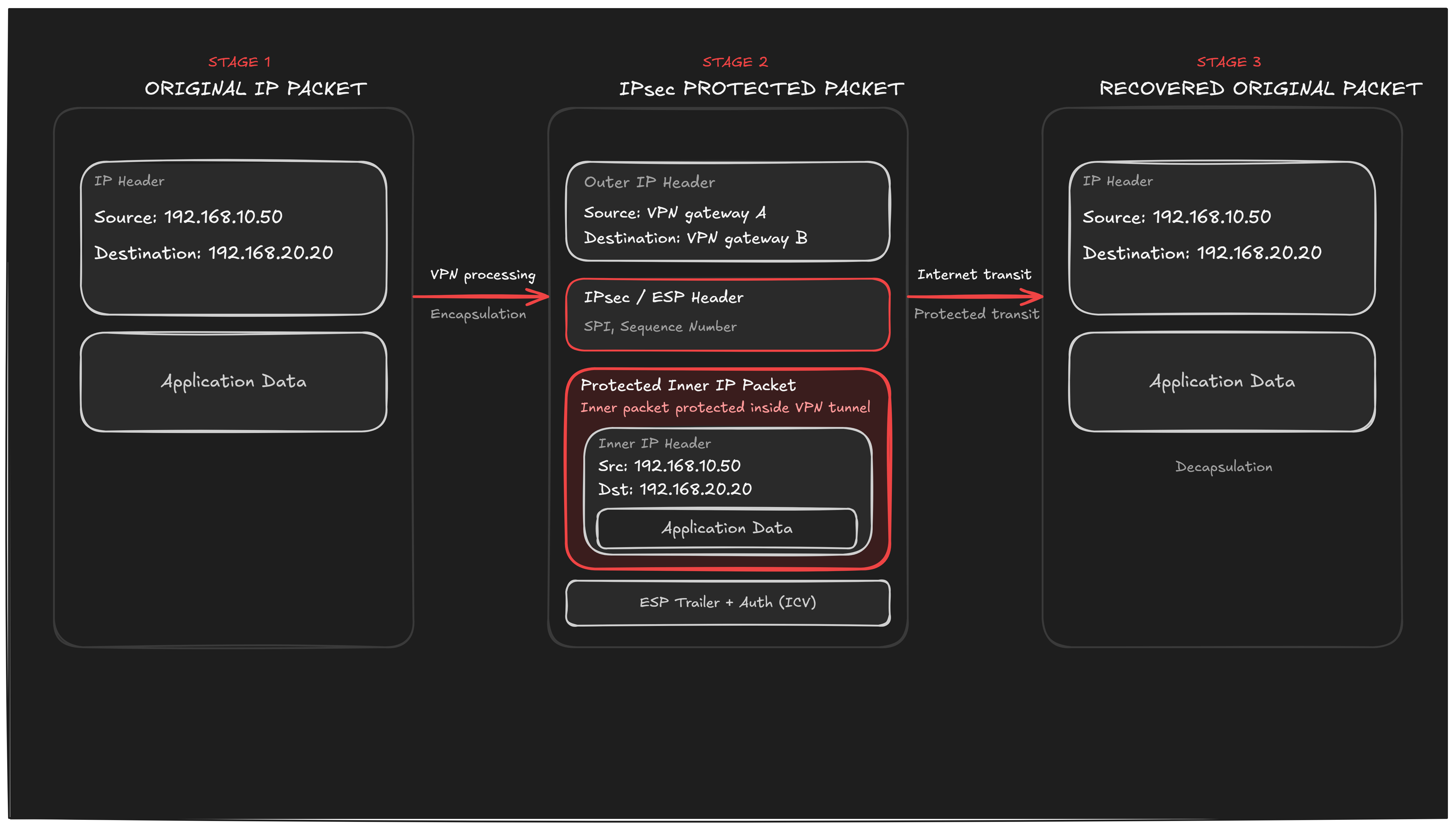
This shows what happens to a packet while it crosses the Internet: the original inner packet is encapsulated and protected, and only restored upon reaching the remote gateway.
8. What Is a VPN Tunnel?
A VPN tunnel is a logical communication path created between VPN endpoints.
The important point is:
A VPN tunnel is logical, not physical.
The Internet supplies the actual network path. The VPN creates a protected communication relationship over that path.
For a Site-to-Site VPN:
Gateway A ═══════════════════════════ Gateway B
          <------ VPN Tunnel ------->
The tunnel remains available while the VPN session is active and its security parameters remain valid.
9. Encryption: How Is the Data Protected?
Encryption transforms readable data into a form that unauthorized parties should not be able to understand.
Conceptually:
Plaintext
   ↓
Encryption
   ↓
Ciphertext
At the destination:
Ciphertext
   ↓
Decryption
   ↓
Plaintext
In a typical IPsec deployment, cryptographic algorithms are negotiated as part of the VPN setup.
Encryption protects confidentiality, while integrity protection helps detect tampering.
10. Authentication
Before two gateways trust each other, they need a way to authenticate the other endpoint.
Common approaches include:
- Pre-shared keys (PSK)
- Digital certificates (X.509)
- Other identity and authentication mechanisms supported by the VPN implementation
The purpose is to prevent an unauthorized device from pretending to be the legitimate VPN gateway.
11. IPsec and Site-to-Site VPN
A very common technology for Site-to-Site VPNs is IPsec.
IPsec is a collection of protocols and mechanisms designed to secure IP communication at the network layer (Layer 3).
A common Site-to-Site VPN design uses:
IKE / IKEv2
      ↓
Security Association negotiation
      ↓
IPsec protection
      ↓
Secure traffic between gateways
IKE
IKE (Internet Key Exchange) is used to negotiate security parameters and establish the cryptographic material needed for the VPN.
ESP
ESP (Encapsulating Security Payload) is commonly used to provide confidentiality and integrity/authentication protection for IP traffic.
Tunnel Mode
For a Site-to-Site VPN, IPsec tunnel mode is commonly used.
Conceptually:
Original IP Packet
       ↓
 Encapsulated
       ↓
IPsec Protected Packet
       ↓
Internet
The original packet is protected as it crosses the untrusted network.
12. Routing in a Site-to-Site VPN
A VPN is not enough by itself. The gateways must also know where to send traffic.
Suppose the Mumbai network is:
192.168.10.0/24and the Pune network is:
192.168.20.0/24The gateways need routing information such as:
192.168.20.0/24 → VPN Tunneland on the other side:
192.168.10.0/24 → VPN TunnelThe route tells the gateway:
“Traffic for the remote private network should use the VPN path.”
13. Step-by-Step Example
Let us follow one request.
A Mumbai employee wants to access:
Pune Server: 192.168.20.20Step 1 — Application creates data
The employee’s application generates a request.
Step 2 — IP packet is created
Source IP      = 192.168.10.50
Destination IP = 192.168.20.20
Step 3 — Local gateway checks the destination
The Mumbai gateway checks its routing and VPN policies. It determines that 192.168.20.0/24 is the remote VPN network.
Step 4 — VPN gateway protects the packet
The gateway encapsulates and cryptographically protects the traffic.
Step 5 — Internet transports the protected traffic
The protected packet travels through ISP networks and Internet routers. Intermediate routers provide forwarding based on the outer addressing information; they do not need access to the protected inner traffic.
Step 6 — Pune VPN gateway receives it
The Pune gateway verifies that the traffic belongs to the expected VPN/security association.
Step 7 — Packet is decrypted and recovered
The gateway removes the VPN protection and obtains the original IP packet.
Step 8 — Packet enters the Pune LAN
The gateway forwards the traffic toward 192.168.20.20.
Step 9 — Server responds
The server sends a response back to the Pune gateway. The reverse process happens:
Pune LAN
   ↓
Pune VPN Gateway
   ↓
Encrypt / Encapsulate
   ↓
Internet
   ↓
Mumbai VPN Gateway
   ↓
Decrypt / Validate
   ↓
Mumbai LAN
14. Diagram: Complete Communication Flow
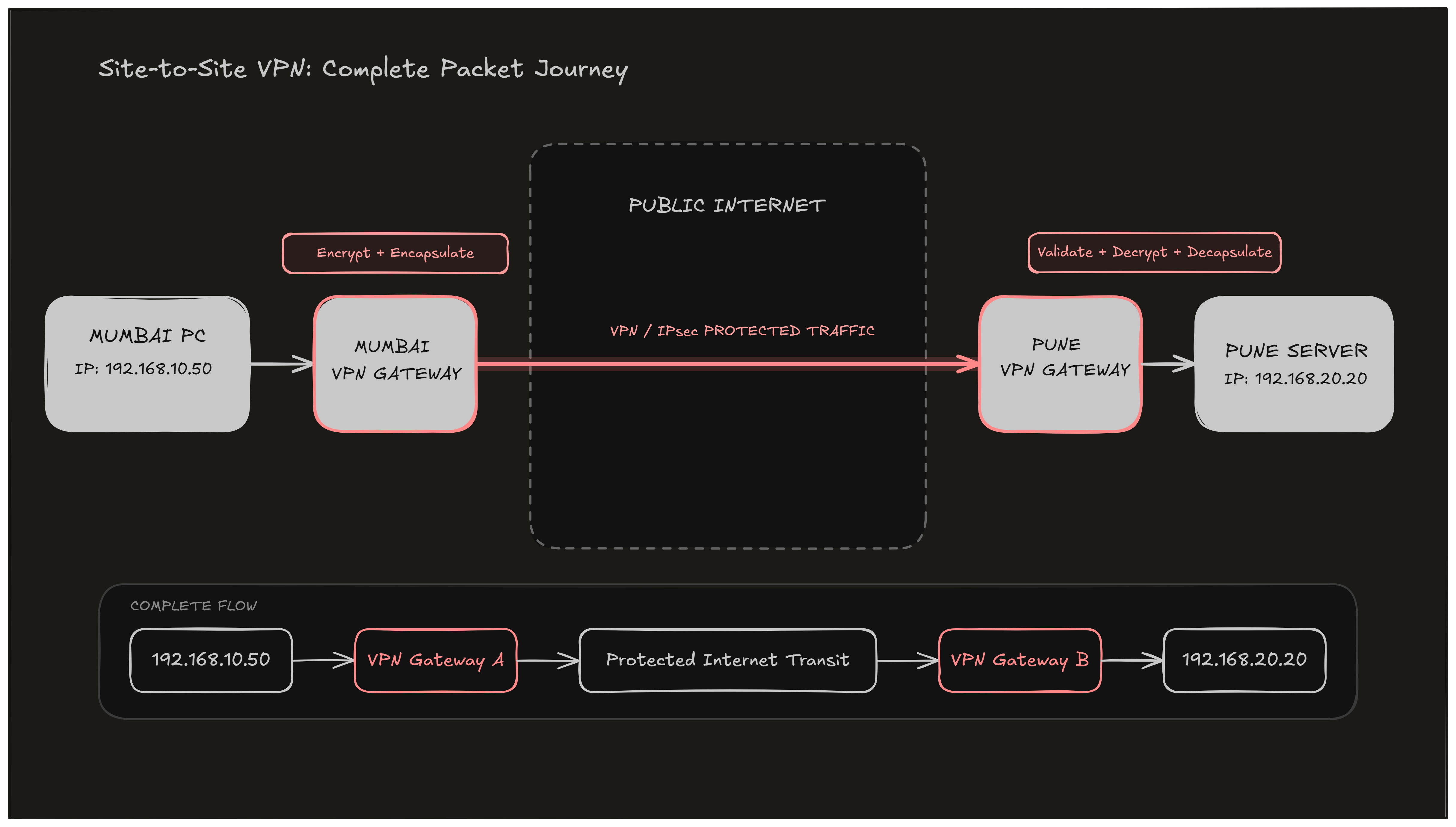
15. Site-to-Site VPN vs Remote-Access VPN
These two VPN types are often confused.
| Feature | Site-to-Site VPN | Remote-Access VPN |
|---|---|---|
| Connects | Network to network | Individual device to network |
| Typical endpoint | VPN gateway | VPN client + VPN gateway |
| Example | Mumbai office ↔ Pune office | Employee laptop ↔ company network |
| User configuration | Usually transparent to users | VPN client is commonly required |
| Main purpose | Interconnect locations | Provide remote access |
In simple words:
Site-to-Site = Network ↔ Network
Remote Access = User Device ↔ Network
16. Advantages of Site-to-Site VPN
Security
Traffic crossing the public Internet can receive cryptographic protection.
Cost Efficiency
Organizations can use Internet connectivity instead of relying entirely on expensive private WAN links.
Scalability
Additional offices and cloud networks can be connected as the organization’s architecture grows.
Transparency
Users inside the private networks can often access remote resources without individually starting a VPN client.
Centralized Management
Security policies can be implemented at the VPN gateways.
17. Limitations and Challenges
A Site-to-Site VPN is not a magic solution.
Internet Dependency
Performance depends on the underlying Internet connections.
Configuration Complexity
Incorrect routing, firewall rules, encryption settings, or network addressing can prevent communication.
Performance Overhead
Encryption and encapsulation introduce processing and packet overhead.
Key and Certificate Management
Authentication credentials and certificates need to be managed securely.
Troubleshooting
Problems may occur at several layers:
Application
    ↓
Transport
    ↓
IP routing
    ↓
VPN policy
    ↓
Encryption / authentication
    ↓
Internet connectivity
18. Security Considerations
A properly designed VPN should consider more than just encryption.
Important security areas include:
- Strong authentication
- Secure cryptographic algorithms
- Proper key management
- Regular software and firmware updates
- Firewall policies
- Least-privilege network access
- Monitoring and logging
- Protection against misconfigured routes
- Careful management of certificates and credentials
A VPN protects the connection between its endpoints, but it does not automatically make every device inside the network trustworthy.
19. Real-World Applications
Site-to-Site VPNs are commonly relevant in architectures such as:
Banking
A bank may connect branch networks to a central data center.
Education
A university may connect separate campuses or administrative locations.
Healthcare
Different facilities may need protected connectivity to centralized applications and services.
Business Offices
Headquarters and branch offices can access shared internal applications.
Cloud Computing
A company can connect its on-premises network to a cloud network using a VPN gateway.
Conceptually:
On-Premises Network
        │
   VPN Gateway
        │
   Secure Tunnel
        │
 Cloud VPN Gateway
        │
   Cloud Network
20. A Simple Analogy
Think of the Internet as a large public road.
Anyone can use the road, so a company does not want sensitive information exposed while traveling across it.
A VPN is similar to creating a secure protected tunnel between two locations along that road.
Office A
   │
   │
   ▼
╔════════════════════════════╗
║     SECURE VPN TUNNEL      ║
║                            ║
║   Protected Traffic        ║
╚════════════════════════════╝
   │
   ▼
Office B
The road represents the Internet. The protected tunnel represents the VPN.
21. Key Terms to Remember
| Term | Meaning |
|---|---|
| VPN | Virtual Private Network |
| Site-to-Site VPN | Connects two private networks |
| VPN Gateway | Device that terminates and manages the VPN |
| Tunnel | Logical protected communication path |
| IPsec | Common technology used for IP-based VPN security |
| IKE/IKEv2 | Negotiates VPN security parameters |
| ESP | IPsec protocol commonly used to protect traffic |
| Encryption | Protects data confidentiality |
| Authentication | Verifies the identity of an endpoint |
| Routing | Determines where traffic should be forwarded |
| Encapsulation | Wraps traffic with additional protocol information |
| Decapsulation | Removes the added encapsulation |
22. Conclusion
A Site-to-Site VPN provides a practical way to connect two private networks across the public Internet.
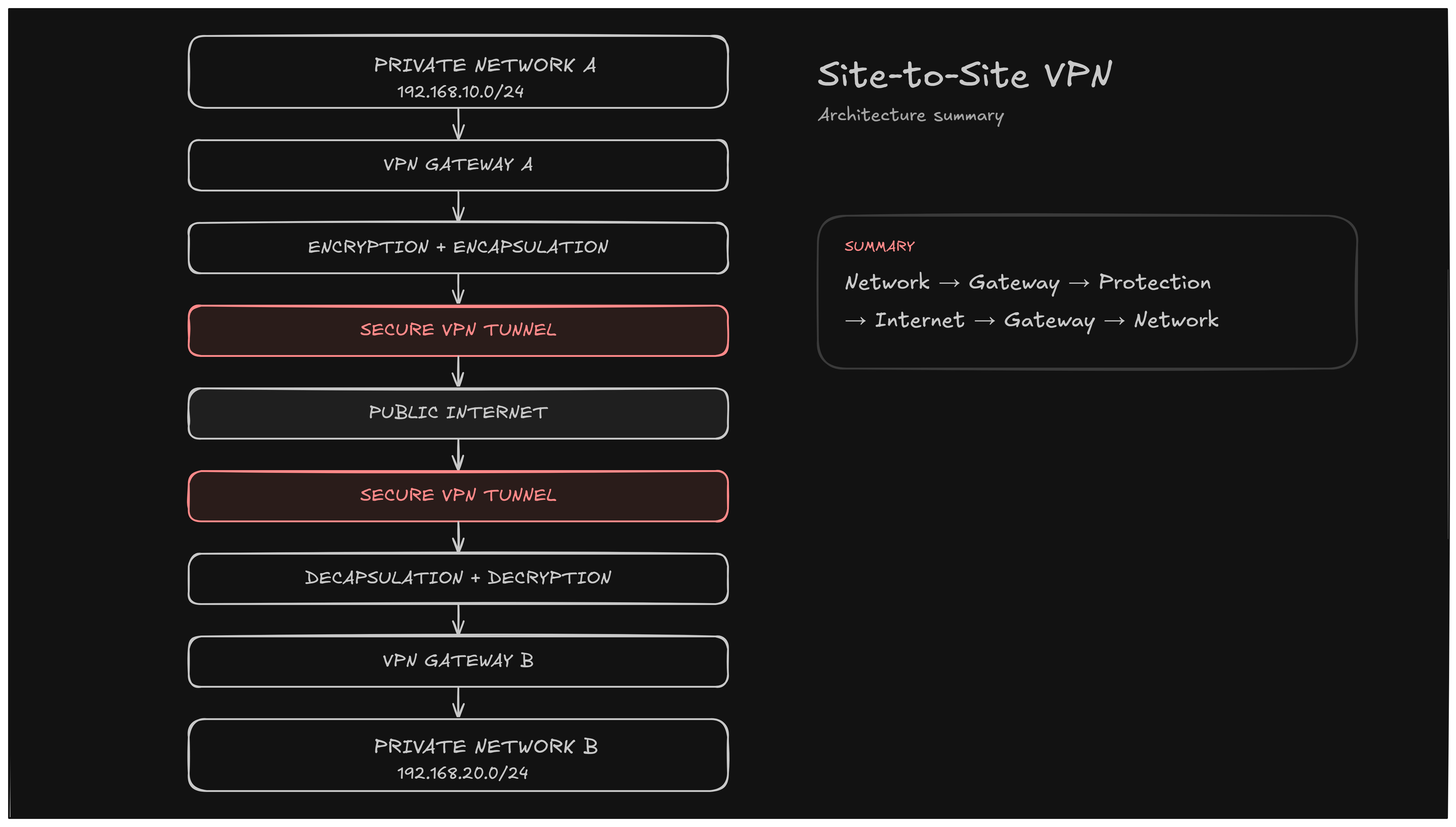
The most important idea is that the VPN does not replace the Internet. Instead, it uses the Internet as transport and adds a protected communication layer between the participating networks.
For an organization with multiple offices, data centers, campuses, or cloud environments, this architecture can provide secure inter-network communication while making use of existing Internet connectivity.
Final takeaway
A Site-to-Site VPN connects two private networks through a secure logical tunnel over an untrusted network such as the Internet.
Quick Revision
What?
→ Network-to-network secure connection

Where?
→ Across the Internet or another shared network

How?
→ VPN gateways + tunneling + cryptographic protection

Common technology?
→ IPsec

Main purpose?
→ Secure communication between private networks

Example?
→ Mumbai Office LAN ↔ Pune Office LAN
References & Further Reading
- Kent, S., & Seo, K. (2005). Security Architecture for the Internet Protocol. RFC 4301. IETF. https://www.rfc-editor.org/rfc/rfc4301
- Kent, S. (2005). IP Encapsulating Security Payload (ESP). RFC 4303. IETF. https://www.rfc-editor.org/rfc/rfc4303
- Kaufman, C., Hoffman, P., Nir, Y., Eronen, P., & Kivinen, T. (2014). Internet Key Exchange Protocol Version 2 (IKEv2). RFC 7296. IETF. https://www.rfc-editor.org/rfc/rfc7296
- Rekhter, Y., Moskowitz, B., Karrenberg, D., de Groot, G. J., & Lear, E. (1996). Address Allocation for Private Internets. RFC 1918. IETF. https://www.rfc-editor.org/rfc/rfc1918
- Forouzan, B. A. (2022). Data Communications and Networking (6th ed.). McGraw-Hill.
- Stallings, W. (2022). Cryptography and Network Security: Principles and Practice (8th ed.). Pearson.
Authored by Third-year students of Btech Computer Engineering Vidyalankar Institute of Technology(VIT), Mumbai
- Rupesh Pandith
- Sumit Kushwaha
- Tina Gaikwad
- Rajneesh Pandey
Under The Guidance of Dr Amit K. Nerurkar (Associate Professor)